

Microsoft has announced exciting updates for Dynamics 365 Sales that are rolling out in the 2025 release wave 2, spanning from October through March. Features include an AI-powered agent that can automate the lead qualification process, enhanced Copilot natural language search capabilities, and new hierarchical data visualizations. This article can help you understand which tools are available for use now and which will be released over the next few months. 2025 release wave 2 for Dynamics 365 Sales focuses on providing updates to the artificial intelligence (AI) and Copilot experiences for sales users. By using a modern platform like Dynamics 365, organizations can gain a holistic view of their customers’ data and can make informed decisions about their next steps toward operational efficiency and enhanced productivity.
AI & Copilot Innovation
Sales team productivity has a direct correlation to a business’s success. The more time business development professionals can spend working with valuable customer leads, the more often it can translate to increased sales. Advancements in AI and Copilot can help improve the overall sales experience by summarizing information, automating basic tasks, and providing intuitive natural language search and filtering tools to help find desired information quickly.
Form Fill Assist Toolbar
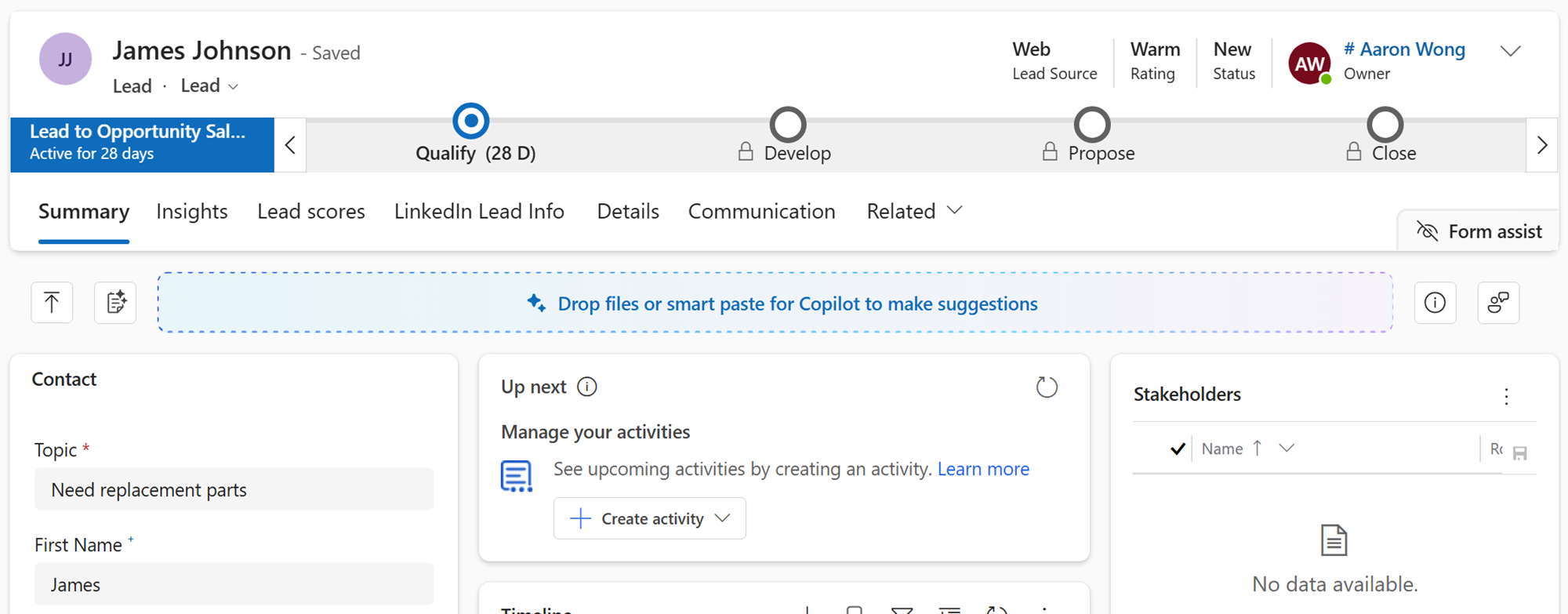
Sales teams need the ability to handle large volumes of contact and lead data, especially when they come from a variety of sources. They may intake leads from emails, scanned documents, web forms, or business cards. Each of these data sources will contain essential information that sales professionals can use to qualify leads and convert them into opportunities. Previously, sales representatives would have to manually enter this data into the customer relationship management (CRM) system. With the new Form Fill Assist toolbar, Dynamics users can upload files directly into the system and have Copilot automatically extract key details and fill in form fields.
Feature Details
- Dynamics currently supports several file types for the Form Fill Assist function:
- .txt, .docx, .csv, .pdf, .png, .jpg, .jpeg, and .bmp
- Users can drag and drop files or use the field selector button to import files
- After importing a file, users can click on the “Accept All” or “Clear All” buttons to accept or clear all data automatically filled out by Copilot
- Copilot also features a Smart Paste button for streamlined data entry
Usage & Timeline Details
- This feature can be enabled for users by admins, makers, or analysts
- General availability for this feature is scheduled for October 2025
Connect AI Agents to Sales Workflows
A long-requested feature is now available with this release: Dynamics 365 agents and assistants can be integrated with other AI assistants. The new Model Context Protocol (MCP) server can be utilized to connect AI assistants like ChatGPT and Claude to Dynamics 365 Sales. Developers may be excited about this update because it reduces the need to build complex and custom solutions to integrate into other systems. End users and sellers will be able to use some of their preferred AI assistants to get their work done efficiently and in one system. Installing the MCP server can be as easy as installing a new mobile app.
Feature Details
The MCP server will initially provide access to the following tools:
- List leads
- Retrieve lead summary (using Copilot in Dynamics 365 Sales)
- Qualify lead to opportunity
- Get outreach email (using Copilot in Dynamics 365 Sales)
- Send outreach email
- And more tools coming soon
Users can build custom agents using Microsoft Copilot Studio that include the Dynamics 365 Sales MCP server or connect with any MCP server-compatible agent platform. The Dynamics 365 Sales MCP Server can connect with enterprise resource planning (ERP) systems like Dynamics 365 Business Central. This can help organizations automate complex cross-functional business operations.
Here are some examples of agents that can be built using MCP tools:
- A prioritization agent, helping teams identify ideal leads gathered from B2B events and add them and others to a customer nurture marketing campaign
- An upsell agent, prospecting post-service customers to craft potential maintenance plans
- An agent that targets existing accounts, finding prospects so that the account manager can set up strategy meetings with key stakeholders
Usage & Timeline Details
- This feature is automatically enabled for admins, makers, marketers, and analysts
- General availability for this feature is scheduled for October 2025
Find, Filter, & Sort Using Natural Language
Here’s another exciting, new Copilot-driven feature coming to the CRM application. Traditional methods of sorting leads and opportunities can be slow and meticulous to configure. With the introduction of smart grids, Copilot can help simplify this process by letting users find, filter, and sort their data using natural language queries. Sales teams can now quickly find insights from their data and make informed decisions to help close deals faster.
Feature Details
- Smart grid can quickly find, filter, and sort data using natural language
- Use Copilot search with a query like “opportunities with estimate revenue greater than $25,000” to quickly refine your view
- Applied filters can be viewed and cleared with one click, switching between the focused and grid views in Dynamics
Usage & Timeline Details
- This feature can be enabled for users by admins, makers, or analysts
- General availability for this feature is scheduled for October 2025
Streamline Data Entry With Smart Paste
In line with the new updates to the Form Fill Assist toolbar, the 2025 release wave 2 plan includes new updates to the smart paste feature powered by AI. Manual data entry often takes a significant amount of time, taking time away from vital selling activities like engaging with prospects and closing deals. Smart paste can help sales professionals stop doing manual, repetitive tasks like data entry.
With this new feature, data copied to your clipboard is analyzed by AI, where it identifies key details and automatically fills in associated fields. Details such as contact information or business descriptions are instantly captured and placed into the corresponding fields within Dynamics.
Feature Details
- Smart paste can be used to generate inline field suggestions by copying the relevant text from your clipboard
- The smart paste tool can be used even when no field is selected, simply by clicking on the smart paste icon or using keyboard shortcuts (Ctrl+V or Cmd+V). AI will automatically determine the correct fields to paste the data into
- Users can then accept or ignore suggestions, editing the form as needed
Usage & Timeline Details
- This feature can be enabled for users by admins, makers, or analysts
- General availability for this feature is scheduled for October 2025
Lead Management
Lead management is a key function within any CRM system. With new enhancements in the 2025 release wave 2 for Dynamics 365 Sales, business development professionals can utilize powerful AI tools for their research, outreach, prospecting, and qualifying workflows. Copilot agents in Dynamics 365 Sales can be tailored to your organization’s industry and business needs, helping you maintain a valuable pipeline of prospective customers. Augmenting your sales team’s research with custom insights and empowering them with relevant information can enhance their ability to find qualified leads.
Personalization and automation are two of the most high-impact changes that Copilot AI can bring to your sales teams. Data quality and overall capabilities can keep improving as your teams continue to use the system. The combination of personalization and automation can help enhance customer engagement and increase customer conversion rates.
Sales Qualification Agent
The Sales Qualification Agent helps alleviate workload by researching information about leads using data from CRM and public web sources. Using Copilot AI, the agent will recommend whether to engage with prospects and further assist by drafting introduction emails to highly rated prospects. The Sales Qualification Agent is the combination of three other AI agents designed to help sales teams focus their efforts on best-fit prospects:
- Research Agent
- This agent automatically gathers and synthesizes data from your CRM and public web sources to give sellers a 360-degree view of each lead. From verifying email addresses to surfacing coworkers who can make introductions, this agent helps opportunities surface.
- Prioritization Agent
- The Prioritization Agent uses your team’s ideal customer profile to recommend which leads may be worth pursuing. It helps filter out noise (irrelevant data) so your team can focus on high-fit prospects.
- Outreach Agent
- This agent crafts personalized emails using insights from the Research Agent, helping sales professionals grab attention and boost response rates.
Admins also can tailor the agents to fit the organization’s needs in various ways:
- Select teams and/or roles that the agents work for, using security groups
- Set up ideal customer profiles
- Augment research sources by adding select public websites relevant to the organization
Another Sales Qualification Agent feature is its ability to validate email addresses as users conduct their research and outreach activities. The agent can verify whether email addresses are personal or work emails. This helps sales teams work efficiently by only sending emails to valid work email addresses. Admins also can validate the agent’s work, which can help maintain data quality standards.
Usage & Timeline Details
- This feature can be enabled for users by admins, makers, or analysts
- General availability for this feature is scheduled for October 2025
Sales Management & Operations
Dynamics 365 Sales provides necessary tools to help sales managers and operations leaders achieve the goals they set for their teams. There are quota management tools and real-time forecasting capabilities that can help leaders provide timely feedback on how their teams can improve performance. Coaches can better spot opportunities to help their sales teams grow and discover areas of improvement.
Data is central to understanding how sales teams can succeed, and Dynamics 365 Sales can bring that data directly to decision makers within an organization. Native dashboards or Power BI reports can be used to provide real-time insights to business leaders, within a tailored viewpoint that can highlight key metrics in any given situation.
Custom Web Sources for the Agent
While the Sales Qualification Agent has out-of-the-box research capabilities that can provide valuable insights, most organizations prefer to use industry-specific resources to gather information about news, trends, and breakthroughs in their field. This release provides an enhancement to the agent by providing it with specific web sources that can refine its research. The enhancement of the Sales Qualification Agent can provide sales teams with tailored, industry-specific insights by pulling data from relevant web sources, enabling more informed decision making and timely outreach to leads. Admins can configure the agent to access specific sources, helping sellers receive pertinent information directly in their workflow.
Usage & Timeline Details
- This feature can be enabled for users by admins, makers, or analysts
- General availability for this feature is scheduled for October 2025
Seller Experiences
With numerous changes coming to the platform surrounding Copilot AI, there’s still the critical human aspect of the sales experience. Sales professionals sometimes encounter daily workflow challenges, and this update has provided some seller-centric solutions that can empower teams to gain control over their responsibilities.
Daily tasks can be streamlined through these updates. With new system capabilities, business development teams can more efficiently manage customer data, monitor the progress of deals, collaborate with team members, and engage with their customers through personalized conversations.
Visualize & Work With Hierarchical Data From Multiple Tables
Sales teams will sometimes work on complex customer records that have multiple contacts, accounts, locations, and other related data. It can be easy to lose track of various touch points, nuances, and quirks that exist within multifaceted client relationships. There may be data silos relating to the various parts of the business; perhaps a sale completed by a different region or industry did not go well, and the sales representative working on a new deal may not know that historical information and be doomed to repeat the same mistake twice. It’s important to be able to present complex customer relationships in a simple visualization and help sales teams understand such complexities and guide their actions toward a successful engagement.
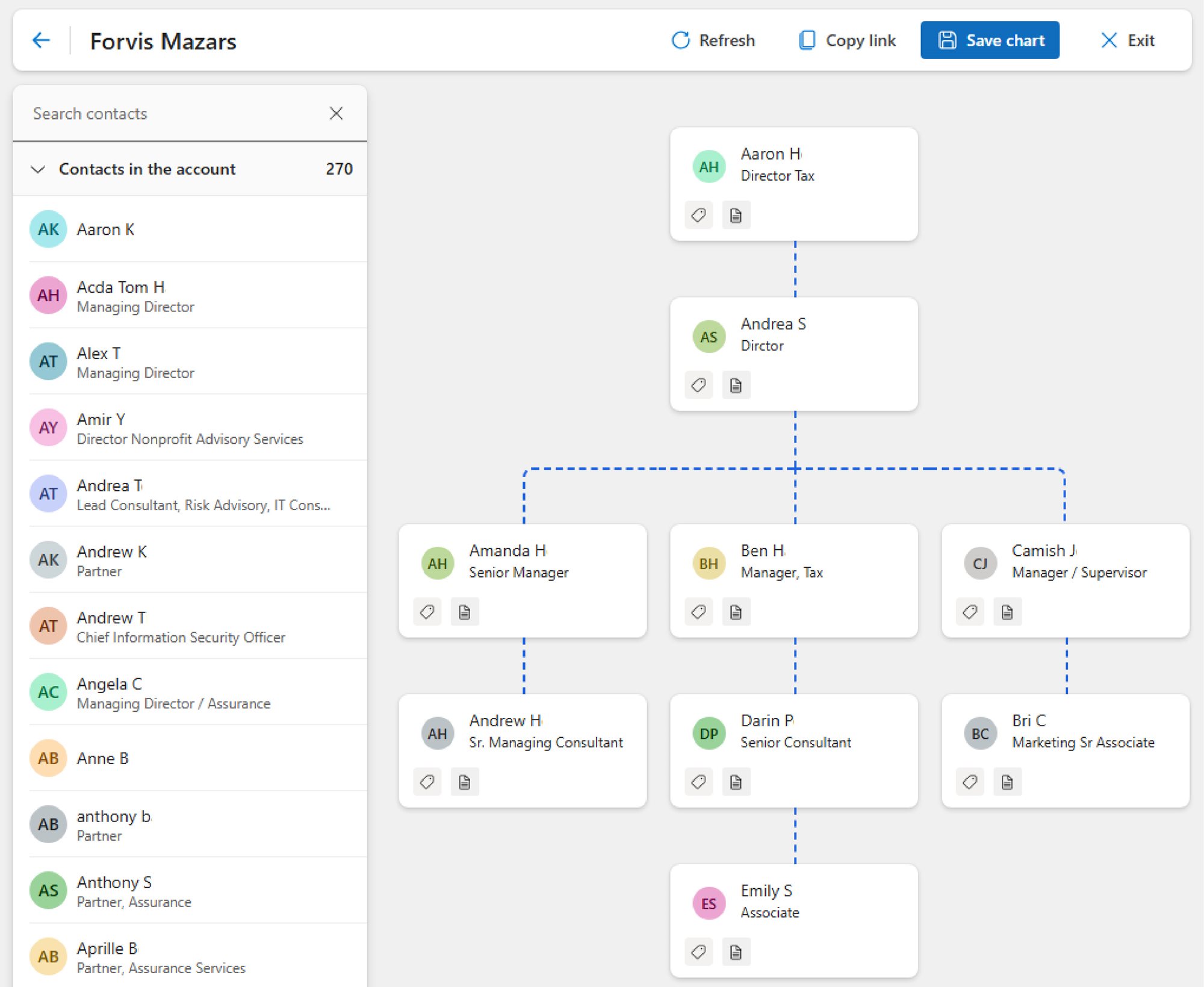
Release wave 2 brings hierarchy control to Dynamics 365 Sales. This functionality provides intuitive data visualizations. Sales representatives can quickly see important connections within a client organization, identify decision makers, and take action as needed. Custom visualizations can be created for your teams to help them see the data important for their day-to-day tasks. The Hierarchical Relationship Visualizer introduces new ways to view data and inform teams.
Feature Details
The Hierarchical Relationship Visualizer helps sales teams view and work with data using simple parent-child relationships.
Configuration
Admins can define hierarchy views for their teams. Currently, this feature supports single-table hierarchies, with multi-table hierarchies coming later this year. The relationships in these hierarchies are established in the data using self-referencing or cross-table relationships; Dataverse Connection tables also can be used to create flexible relationships between any two records. You can customize what data appears on each tile, including size, color, and changing the picture or icon. Up to seven fields on each tile can be shown in the view.
Intuitive Design
Users can zoom in and out, as well as expand and collapse branches, helping them efficiently work with customers of different sizes. You can easily switch between horizontal and vertical display modes, depending on the general shape of the hierarchy. Users can edit data by selecting tiles, which opens a side pane where they can add meeting notes and update fields without leaving the hierarchy view.
Check Your Release Version
Hierarchy control will deploy in Dynamics 365 Sales version 8.3 and is available now. To see what version you are on, click the Settings gear icon (in the upper right of the application interface), go to Advanced settings, and Solutions history in the left navigation. Search for msdny_SalesApp and view the version. A version of 9.0.25083.#### indicates: version 9.0, 2025, release 8.3.
Additional hierarchy control updates, including multi-table complex hierarchies, are scheduled to be released closer to November 2025.
Getting Started
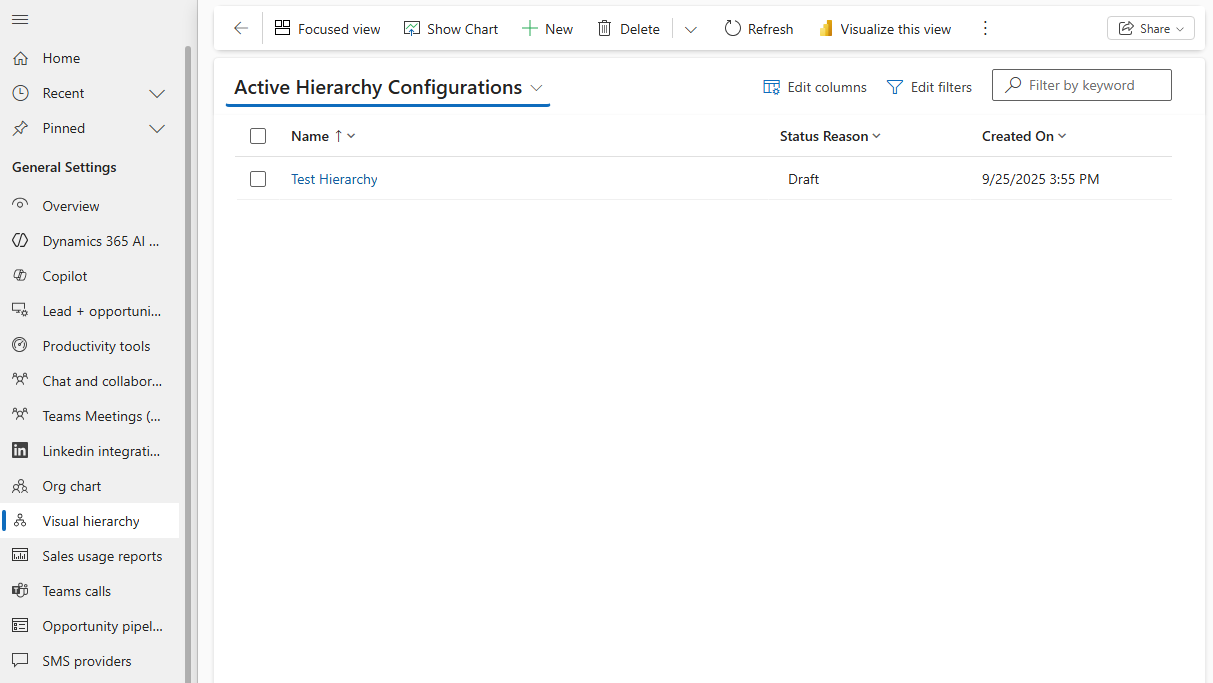
Once this feature is deployed in your CRM environment, admins will see a new menu option, “Visual hierarchy,” in the App settings menu. They will be able to create and publish hierarchies in the environment. Once published, system users will see a “View hierarchy” button on the command bar to view the hierarchy for that record.
Usage & Timeline Details
- This feature can be enabled for users by admins, makers, or analysts
- Public preview is available now, with general availability scheduled near November 2025
How Forvis Mazars Can Help
Leveraging a certified Microsoft Partner can help you unlock the full potential of these updates in your Microsoft Dynamics 365 CRM system. Our certified and experienced technology consultants are ready to help you prepare and implement these upgrades to help your sales team build momentum. Connect with the Microsoft team at Forvis Mazars to explore how our professionals can assist you in getting more value from your CRM system.